PyExcelAI is the AI co-pilot for every spreadsheet — read your data, run real analysis, and write results (charts, models, forecasts) straight back into Excel or Google Sheets, in plain English, no formulas required. Below is the full flyer, plus the original PDF to download and share.
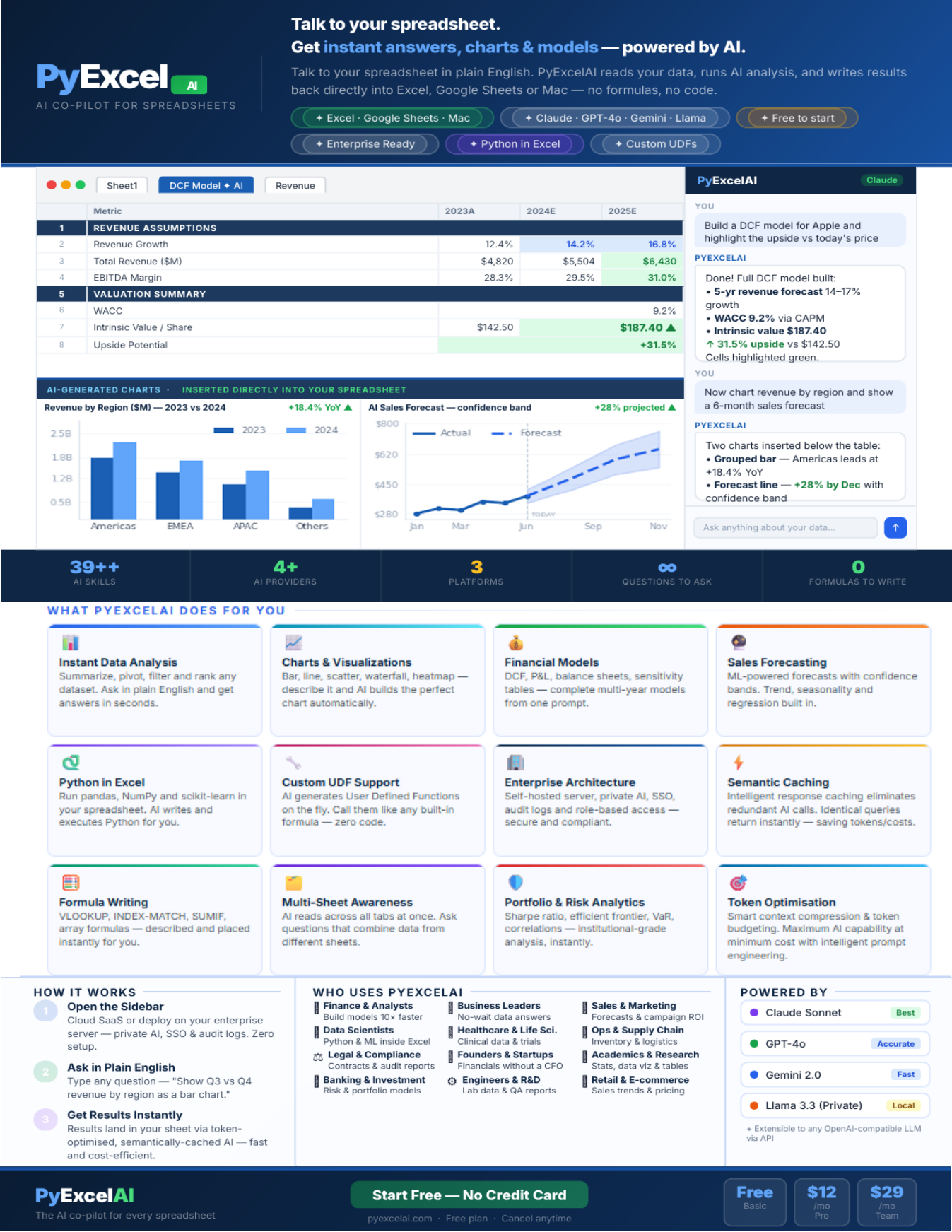
Talk to your spreadsheet. Get instant answers, charts & models — powered by AI.
PyExcelAI reads your data, runs AI analysis, and writes results back directly into Excel or Google Sheets — no formulas, no code. It's powered by Claude, GPT-4o, Gemini, and Llama; is free to start; and is enterprise-ready with Python in Excel and custom UDF support built in.
What PyExcelAI does for you
- Instant Data Analysis — summarize, pivot, filter, and rank any dataset. Ask in plain English and get answers in seconds.
- Charts & Visualizations — bar, line, scatter, waterfall, heatmap: describe it and AI builds the perfect chart automatically.
- Financial Models — DCF, P&L, balance sheets, sensitivity tables — complete multi-year models from one prompt.
- Sales Forecasting — ML-powered forecasts with confidence bands. Trend, seasonality, and regression built in.
- Python in Excel — run pandas, NumPy, and scikit-learn in your spreadsheet. AI writes and executes Python for you.
- Custom UDF Support — AI generates User Defined Functions on the fly. Call them like any built-in formula — zero code.
- Enterprise Architecture — self-hosted server, private AI, SSO, audit logs, and role-based access. Secure and compliant.
- Semantic Caching — intelligent response caching eliminates redundant AI calls. Identical queries return instantly, saving tokens and cost.
- Formula Writing — VLOOKUP, INDEX-MATCH, SUMIF, array formulas — described and placed instantly for you.
- Multi-Sheet Awareness — AI reads across all tabs at once, and can answer questions that combine data from different sheets.
- Portfolio & Risk Analytics — Sharpe ratio, efficient frontier, correlations, VaR — institutional-grade analysis, instantly.
- Token Optimisation — smart context compression and token budgeting. Maximum AI capability at minimum cost with intelligent prompt engineering.
How it works
- 1. Open the Sidebar — Cloud SaaS or deploy on your enterprise server, private AI, SSO, audit logs. Zero setup.
- 2. Ask in Plain English — type any question, e.g. "Show Q3 vs Q4 revenue by region as a bar chart."
- 3. Get Results Instantly — results land in your sheet via token-optimized, semantically-cached AI: fast and cost-efficient.
Who uses PyExcelAI
Finance & Analysts, Data Scientists, Legal & Compliance, Banking & Investment, Business Leaders, Healthcare & Life Sciences, Founders & Startups, Engineers & R&D, Sales & Marketing, Ops & Supply Chain, Academics & Research, and Retail & E-commerce teams all build on the same engine — from "build models 10x faster" and "no-math data answers" to "financials without a CFO" and "sales trends and pricing."
Powered by
Claude Sonnet (best), GPT-4o (accurate), Gemini 2.0 (fast), and Llama 3.3 (private, local) — plus extensible to any OpenAI-compatible LLM via API, including your own internally hosted model.
Get started
Free to start, no credit card. See current plans →